
9 Website Usability Mistakes Blackpool Businesses Need to Avoid
- Mobile First Design
- Fast Websites
- Fair Pricing
- Mobile First Design
- Fast Websites
- Fair Pricing
9 Website Usability Mistakes Blackpool Businesses Need to Avoid
If you run a business in Blackpool, your website is often the first impression potential customers get — and a frustrating experience can lose them before you even get a call. Usability isn’t just a buzzword; it’s about making your visitors’ lives easier so they stay, engage, and ultimately become clients.
Here are 9 common usability mistakes Blackpool businesses make — and how to fix them fast.
1. Tiny Click Areas
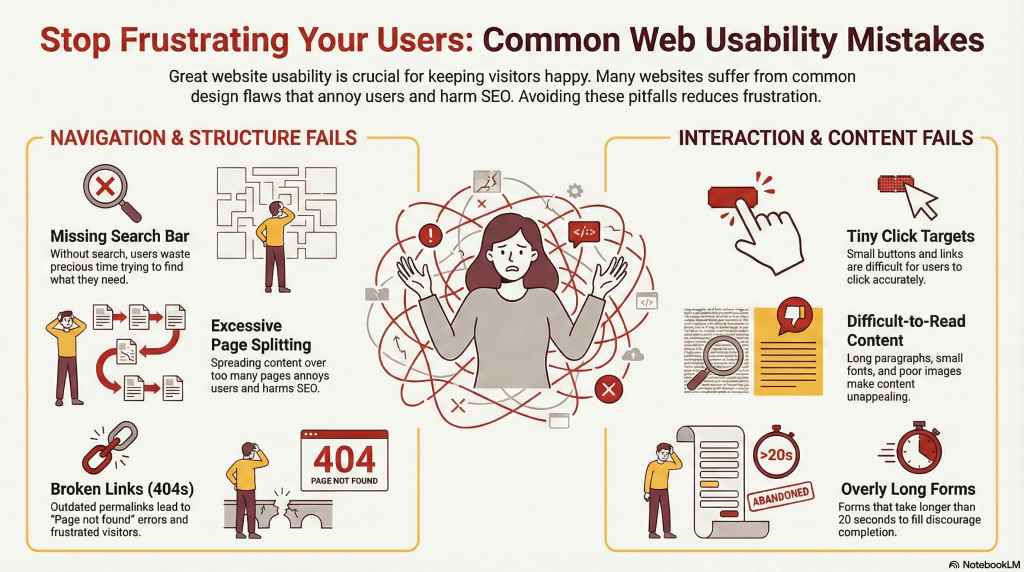
Small buttons and links frustrate users, especially on mobile devices. Make sure every clickable element has enough size or padding so visitors can tap or click easily. For Blackpool businesses, even minor annoyances can cause local customers to leave your site before seeing your services.
2. Too Many Pages
Splitting content into multiple pages may seem like a good idea for load times, but it can feel like a maze. Blackpool visitors don’t have time to click endlessly. Keep your content concise and accessible to reduce frustration and improve both engagement and SEO.
3. Duplicate Pages and Titles
Repeated or generic page titles confuse users and search engines. Every page should clearly describe its content. Unique titles help Blackpool customers quickly understand what your business offers and make your site easier to navigate.
4. Hard-to-Read Content
Long paragraphs, dense text, or poorly placed images are intimidating. Use short paragraphs, headers, bullet points, and high-quality visuals. Clear, scannable content keeps Blackpool visitors engaged longer and helps them understand your services quickly.
5. Missing Contact Information
Your contact info should be easy to find. Blackpool customers want to know how to reach you without hunting through menus. Prominently display phone numbers, email addresses, and business locations so potential clients can get in touch instantly.
6. No Search Functionality
A search bar helps visitors find what they need fast. Blackpool business users value efficiency — giving them a quick way to locate services or information reduces frustration and increases the chance they’ll stay on your site.
7. Features Locked Behind Log-ins
Some functionality may require registration, but don’t block too much content. Local businesses and potential clients often leave if they feel barriers prevent them from exploring your services freely. Keep core information accessible to everyone.
8. Outdated Permalinks
Broken links or outdated URLs create frustration and harm SEO. Regularly review and update your links, using 301 redirects when necessary. Blackpool businesses benefit from smooth, error-free navigation that keeps visitors on your site longer.
9. Lengthy Forms
Long forms discourage engagement. Keep forms simple and fast — ideally no more than 20 seconds to complete. Local clients are busy and will abandon forms that feel like a chore. Short, clear forms improve conversions for Blackpool websites.
Conclusion
Usability is about less thinking, less effort, and less frustration — and it’s especially important for Blackpool businesses competing in a local market. By making your website easy to use, you’re not just improving user experience — you’re turning visitors into clients. Which of these usability fixes will you tackle first on your site?
Frequently Asked Questions
What makes a website user-friendly for Blackpool businesses?
A user-friendly site is easy to navigate, loads quickly, has readable content, and makes key actions (like contacting you) simple. Local context matters, so showing relevant services and location info helps.
How can I test if my Blackpool website is easy to navigate?
Ask real users, ideally local customers, to complete tasks on your site. Watch where they hesitate or get frustrated, and adjust menus, buttons, and links accordingly.
Are mobile-friendly sites more important for local businesses?
Absolutely. Many Blackpool users search on mobile, especially on the go. A mobile-friendly site improves both user experience and SEO rankings.
How do small usability improvements affect enquiries?
Even minor changes — like larger buttons, fewer clicks to contact, or clearer headings — can increase engagement and lead to more enquiries from local clients.
Should my Blackpool business website have a search bar?
Yes. A search bar helps visitors find exactly what they need quickly, reducing bounce rates and keeping potential clients engaged.
How often should I review website links and pages?
At least once every few months. Check for broken links, outdated content, and SEO updates to keep your Blackpool website relevant and functional.
Do long forms reduce conversions for local clients?
Yes. Busy Blackpool business owners or residents won’t fill out lengthy forms. Keep forms short, simple, and user-friendly.
Can usability changes improve SEO for Blackpool-targeted searches?
Yes. Search engines favor sites that are easy to navigate, fast, and engaging. Improving usability helps both your local rankings and user satisfaction.