
What Is a Favicon? And How to Optimise Your Logo for One
- Mobile First Design
- Fast Websites
- Fair Pricing
- Mobile First Design
- Fast Websites
- Fair Pricing
What Is a Favicon? And How to Optimise Your Logo for One
You’ve seen favicons thousands of times — even if you’ve never heard the word.
They’re the tiny icons that appear:
In browser tabs
In bookmarks
On mobile home screens
In some search results
They’re small, but they quietly affect how professional your website looks.
If your favicon is blurry, missing, or just the default WordPress icon, it sends an unspoken message:
This site isn’t quite finished.
Here’s what favicons are, why they matter, and how to make sure yours actually works.
What is a favicon?
A favicon is a small version of your logo or brand mark used to represent your website in browsers and devices.
It helps with:
Brand recognition
Trust
Usability (people find your tab faster)
Professional polish
Even though it’s tiny, it’s part of your overall brand system.
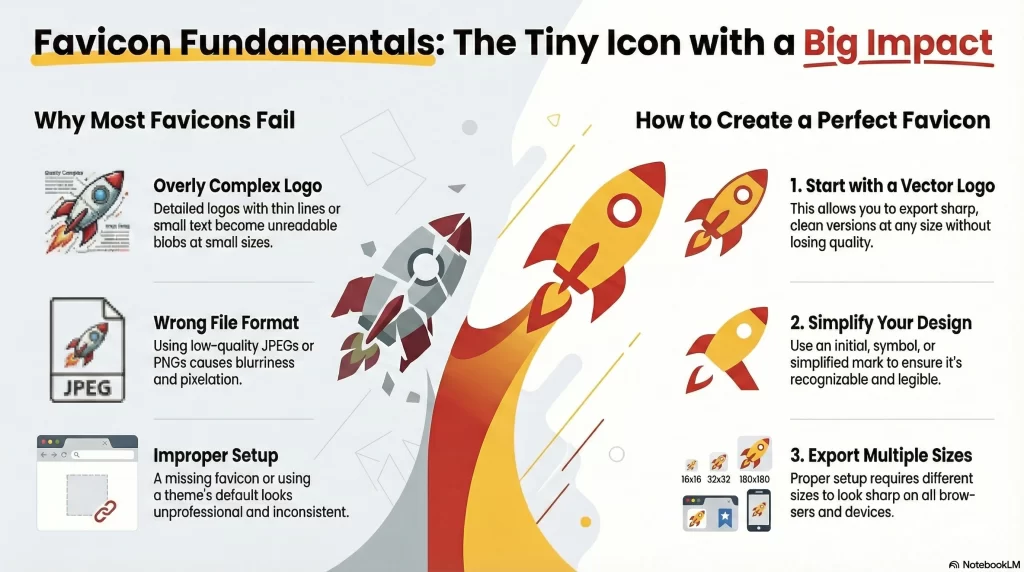
Why favicons often look bad
Favicons usually look wrong for one of three reasons:
1. The logo wasn’t designed for small sizes
Detailed logos with:
Thin lines
Small text
Complex shapes
Don’t scale down well.
What looks great on a website header can become an unreadable blob in a 16×16 pixel icon.
2. The wrong file format is used
If your favicon is created from:
A stretched PNG
A screenshot of your logo
It will almost always look soft or pixelated.
This is another place where vector logos make a huge difference.
3. It wasn’t set up properly
Many sites:
Don’t set a favicon at all
Use the theme default
Upload a random image without proper sizes
That leads to inconsistent results across browsers and devices.
The right way to create a favicon
Start with a vector logo
Your favicon should be based on a clean vector version of your logo.
This allows you to:
Export sharp versions at multiple sizes
Simplify the design if needed
Maintain brand consistency
If your logo only exists as a JPEG or PNG, that’s usually the root of the problem.
Create a simplified version if needed
For many businesses, the full logo doesn’t work at favicon size.
A better option is often:
An initial
A symbol
A simplified mark
This gives you a favicon that’s:
Recognisable
Clean
Legible at tiny sizes
Export the correct sizes
Modern favicons use multiple sizes for:
Desktop browsers
Mobile devices
App shortcuts
A proper setup includes several exports so your icon looks sharp everywhere.
Why this matters for your website
Favicons are a small thing — but they’re a trust signal.
They affect:
How professional your site feels
How easy it is for users to find your tab
How consistent your branding looks
When someone has 20 tabs open, a clear favicon makes your site easier to return to.
That’s a tiny usability win that adds up.
How this connects to logo file formats
If you’ve read about JPEG vs vector logos, favicons are a perfect real-world example of why vectors matter.
Without proper logo files:
Favicons look blurry
Branding becomes inconsistent
Small details break
Favicons expose file format problems faster than almost anything else on a website.
Frequently Asked Questions
What size should a favicon be?
Favicons are created in multiple sizes, commonly including 16×16, 32×32, 48×48, and larger sizes for mobile devices. A proper setup includes several versions.
Can I just upload my logo as a favicon?
You can, but it often doesn’t work well. Full logos are usually too detailed for favicon sizes. A simplified version based on your logo works much better.
Why does my favicon look blurry?
This is usually caused by using a low-quality image or exporting from a pixel-based file instead of a vector logo.
Do I need a vector logo to create a good favicon?
It’s not strictly required, but it makes a huge difference. Vector files allow clean exports at every size.
Is favicon setup included in your web design service?
Yes. When I build or rebuild websites, favicon setup is part of making sure everything looks professional and consistent.
Do you help Blackpool businesses with favicon and logo setup?
Yes. I work with Blackpool businesses to make sure their logos and favicons are properly set up for modern websites.
Can you create a favicon if I only have a JPEG logo?
Yes. If needed, your logo can be vectorised first, then used to create a clean, professional favicon.
Is this important for small business websites?
Absolutely. Even small details like favicons help build trust and polish, especially for Blackpool-based businesses competing online.