How to Use AI to Create a Logo (Without Wrecking Your Website Later)
- Mobile First Design
- Fast Websites
- Fair Pricing
- Mobile First Design
- Fast Websites
- Fair Pricing
How to Use AI to Create a Logo (Without Wrecking Your Website Later)
AI logo tools have made it easier than ever to create a logo in minutes. Type a few prompts, pick a style, and suddenly you’ve got something that looks “good enough”.
But here’s the bit most people don’t realise:
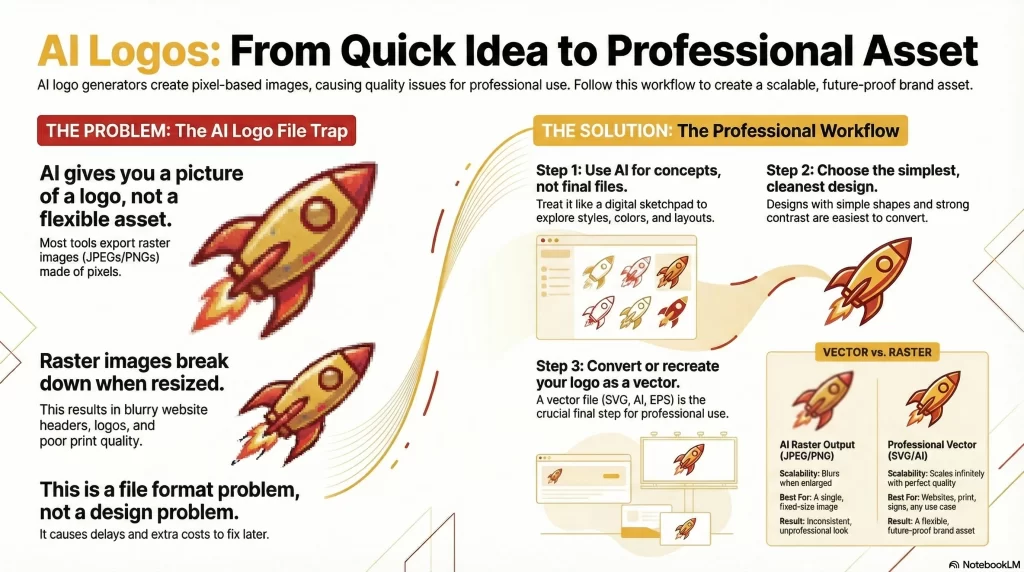
An AI-generated logo is usually just an image — not a proper logo asset.
If you don’t handle it correctly, that quick win can turn into:
Blurry website headers
Logos that don’t scale properly
Problems with print, signage, and social media
Extra costs later to fix file issues
This guide explains how to use AI logo tools properly, so your logo works across your website and beyond — not just inside the AI platform.
What AI logo tools actually give you
Most AI logo generators export your logo as:
JPEG
PNG
These are raster images, made of pixels.
They can look fine at one specific size, but they:
Lose quality when resized
Can’t scale cleanly
Aren’t ideal for responsive websites
Often cause issues with print
In other words, you’re getting a picture of a logo — not a flexible brand asset.
This is where many business owners run into the same problems covered in JPEG vs Vector Logos.
Why vector still matters (even with AI)
A proper logo should exist as a vector file (such as SVG, AI, or EPS).
Vector logos:
Scale infinitely without losing quality
Work properly on modern websites
Are required for most professional printing
Make it easier to create things like favicons, social icons, and signage
AI tools rarely give you true vector files that are ready for real-world use.
So while AI can help with design ideas, it usually doesn’t finish the job.
The right workflow for AI-generated logos
If you want to use AI without causing problems later, this is the safest approach:
1. Use AI for concept, not final files
Treat AI like a sketchpad:
Explore styles
Try layouts
Test colours and fonts
Don’t assume the exported file is your final logo.
2. Choose the cleanest version
Pick the simplest, clearest version:
Fewer tiny details
Strong contrast
Simple shapes
These are much easier to convert into proper vector formats later.
3. Convert or recreate as a vector
This is the key step most people skip.
Your AI logo should be:
Vectorised
Rebuilt as a clean SVG or AI file
Supplied with proper web and print formats
This ensures your logo works on:
Websites
Mobile headers
Favicons
Print materials
Social media
Without this step, you’re likely to run into the same blurry logo issues again and again.
Why this matters for your website specifically
Modern websites:
Resize logos dynamically
Display on high-resolution screens
Use different sizes for desktop and mobile
If your logo is only a JPEG or PNG:
It may look fine in one place
And terrible in another
That’s not a design problem.
That’s a file format problem.
This is why many website rebuilds get slowed down by logo issues that started with AI-generated files.
AI + professional setup = best of both worlds
AI isn’t the enemy here.
Used properly, it can:
Speed up idea generation
Lower initial design costs
Help you explore directions quickly
But for a business website, you still need:
Proper vector files
Clean exports
Formats that developers can actually use
That’s where AI stops — and proper logo setup begins.
Frequently Asked Questions
Can I use an AI-generated logo on my website?
Yes, but it’s best to convert it into proper vector and web-ready formats first. Using the raw JPEG or PNG from an AI tool often leads to blurry or inconsistent results.
Do AI logo tools give you vector files?
Most don’t provide true, production-ready vector files. Even when they claim to, the files often need cleaning up to work properly across websites and print.
Why does my AI logo look blurry on my website?
This usually happens because the logo is a pixel-based image being resized by your site. Converting it to a proper vector format prevents this.
Can you turn my AI-generated logo into a proper vector?
Yes. I help businesses turn AI-generated logos into clean, scalable vector files that work properly for websites, print, and branding.
Is this something you offer for Blackpool businesses?
Yes. I work with Blackpool businesses to vectorise and optimise logos so they work properly across websites and marketing materials.
Will vectorising change how my AI logo looks?
The goal is to keep it visually the same while improving quality and usability. Any adjustments are made carefully to preserve your chosen style.
Do I need a new logo if I used AI?
Not necessarily. If you’re happy with the design, vectorising and cleaning up the files is often enough to make it website-ready.
Is logo setup included in your web design service in Blackpool?
Yes. For Blackpool-based businesses, logo setup and optimisation is often part of making sure a new or rebuilt website looks professional from day one.